Kotora is a native anime tracker for Linux and macOS. It sees the episode in mpv, IINA, VLC, mpc-qt, Celluloid, Haruna or SMPlayer with no setup, and asks once before it updates your MyAnimeList.
Free and open source (GPL-3.0) · Rust, GPU-drawn · a tribute to Taiga
[Hoshi] Lanterns of Kirigaoka - 06 (1080p).mkv — mpv
Lanterns rise for those who remember.
14:28 / 23:40EP 06
KotoraSynced 2 min ago
LKPlaying in mpvLanterns of Kirigaoka · episode 6 · 61%
LKWatching Lanterns of Kirigaoka ep 682% watched · matched in your listUpdate to 6 / 12?
Recorded episode 6Lanterns of Kirigaoka · waiting to sync
Okay, not now.kot confirm still records it later.
Watching12Progress
LKLanterns of KirigaokaAiringWaiting to sync56 / 12+1
SDStarfall Delivery ServiceAiringEp 9 on Wed8 / 13+1
MSMikan Street DetectivesFinished airing7 / 24+1
SLSlow Life on Hoshizora IslandAiringEp 4 on Sun3 / 12+1
mpv → Kotora IPC socket
A live sketch of the app in HTML. All titles are made up.
Play ▸ Notice ▸ Record ✓小虎 Kotora ·Play ▸ Notice ▸ Record ✓小虎 Kotora ·Play ▸ Notice ▸ Record ✓小虎 Kotora ·Play ▸ Notice ▸ Record ✓小虎 Kotora ·
EP 01How it works
No typing. No forgetting.
You watch the way you always do. Kotora sits in the background, sleeps until a player says something, and speaks up once the episode counts as watched.
1
Press play
Open a file in your own player. Kotora doesn't play anything and there is nothing to set up: it sees which video file the player has open.
$ mpv "[Hoshi] Lanterns of Kirigaoka - 06 (1080p).mkv"
2
Kotora notices
It reads the file name, finds the show in your list and shows you why it matched. When the episode counts as watched, it asks: at 80 % with precise detection, or after the file has stayed open a while.
→ Lanterns of Kirigaoka · episode 6 · in your list
3
One click, recorded
Press Update, or run kot confirm. The change lands at once and goes to MyAnimeList, now or when you are back online.
✓ 6 / 12 · Watching · synced
EP 02How it reads
Messy file names are fine.
Release names come in every shape, and often use the English title. Kotora reads them with anitomy-ng, a Rust take on anitomy, the parser by Taiga's author. See how it splits a file name: paste one or pick an example.
Title
Mecha Bento Club
Episode
11 (version 2)
Season
–
Group
Tsukimi-Subs
Resolution
720p
Other
CRC A1B2C3D4 · mkv
Next, Kotora looks for Mecha Bento Club in your list. No match? One rate-limited MyAnimeList search, cached for 30 days.
A toy: a few dozen lines of JavaScript that run in your browser and send nothing. The app uses the real anitomy parser and also checks folder names and seasons.
EP 03Features
Small app, sharp claws.
Everything v0.1 does to keep your MyAnimeList up to date, and nothing that gets in your way.
It asks first
Kotora never touches your list behind your back. If you trust it, switch on automatic updates: it still asks when the match is unsure, an episode would be skipped or it hasn't aired yet, and every automatic update has Undo.
Update automatically
Off by default. Kotora asks every time.
Offline-first, never silent
Your list opens from a local cache. Changes land at once and wait in a queue you can see. If MyAnimeList disagrees, you pick.
WaitingMecha Bento Club4 → 5
ConflictMikan Street Detectivesyours 7 · MAL 8
SentStarfall Delivery Service8 / 13
Native and light
Rust and a GPU-drawn UI. No Electron, no web view.
binary
~30MB
CPU at rest
0.00s/min
kot status
2ms
Measured in testing; budgets are checked at every stage.
Recognition you can read
Every match says why. If it guessed wrong, "Wrong anime…" offers the closest titles and remembers your pick.
● In your list (Watching), sure: same title in your list
● Not sure: close to a title in your list (95 %)
It finishes the show
Record the last episode and the entry becomes Completed. Start a Plan to watch show and it moves to Watching.
Watching → Completed 12 / 12
Zero-setup detection
Kotora sees mpv, VLC, mpc-qt, Celluloid, Haruna and SMPlayer by the video file they have open. No config, no plugins. The episode counts once the file has stayed open long enough, and Kotora asks.
Want exact progress? "Precise detection" for mpv is one click and uses the position (80 %).
Search and add
Search MyAnimeList from the app and add a title as Watching, Plan to watch or any other status. It works offline too: the add waits in the queue.
kot add <title>
A page for every title
Score, rank, studios, genres and synopsis for any anime, on your list or not. If it is on your list, you edit your entry right there.
Home, and three views
Home shows what to continue, what airs this week and what you plan to watch. Each list can be rows, a grid of covers or large cards, sorted either way.
What's airing
The Airing page lists this week's episodes and this season's shows from MyAnimeList, with yours marked. Add one with + Watching or + Plan.
Times are estimates from the broadcast time.
Notifications with buttons
Update and Not now, or Undo, right in the notification. Kotora also tells you when a show you plan to watch starts airing, and when a new episode of one you watch is out.
Play the next episode
Point Kotora at your anime folders. Watching rows get a ▶ that opens the next episode in mpv, IINA, VLC or your default player.
kot next <title>
Out of the way
Close the window and Kotora keeps watching from the tray, or the menu bar on macOS. It can start when you log in, in the background.
Your way
Light or dark, following your system. Titles in romaji, English or Japanese. A Profile page with your MyAnimeList numbers and your scores.
Kotora sees the players you already use by the video file they have open. Nothing to configure. More on the Linux and macOS pages.
mpv
mpv
Seen by its open file, with no setup. For exact position, precise detection in Settings adds one line to your mpv.conf when you click it.
LinuxmacOS
VLC
VLC
Nothing to set up. On macOS, Kotora sees its open file; for the position, turn on its web interface with a password you choose (opt-in).
LinuxmacOS
mpc
mpc-qt
The MPC-HC look on Linux. Nothing to set up.
Linux
IINA
IINA
mpv inside. Seen by its open file, with no setup. Precise detection is one click in Settings when IINA uses a config folder.
macOS
+
Celluloid, Haruna, SMPlayer
Seen by their open file, with no setup. Other players that report a file to the desktop work as well.
Linux
www
Streaming sites
Not Kotora's job: use the MAL-Sync browser extension.
Browser
EP 05The app
Dark or light, one orange button.
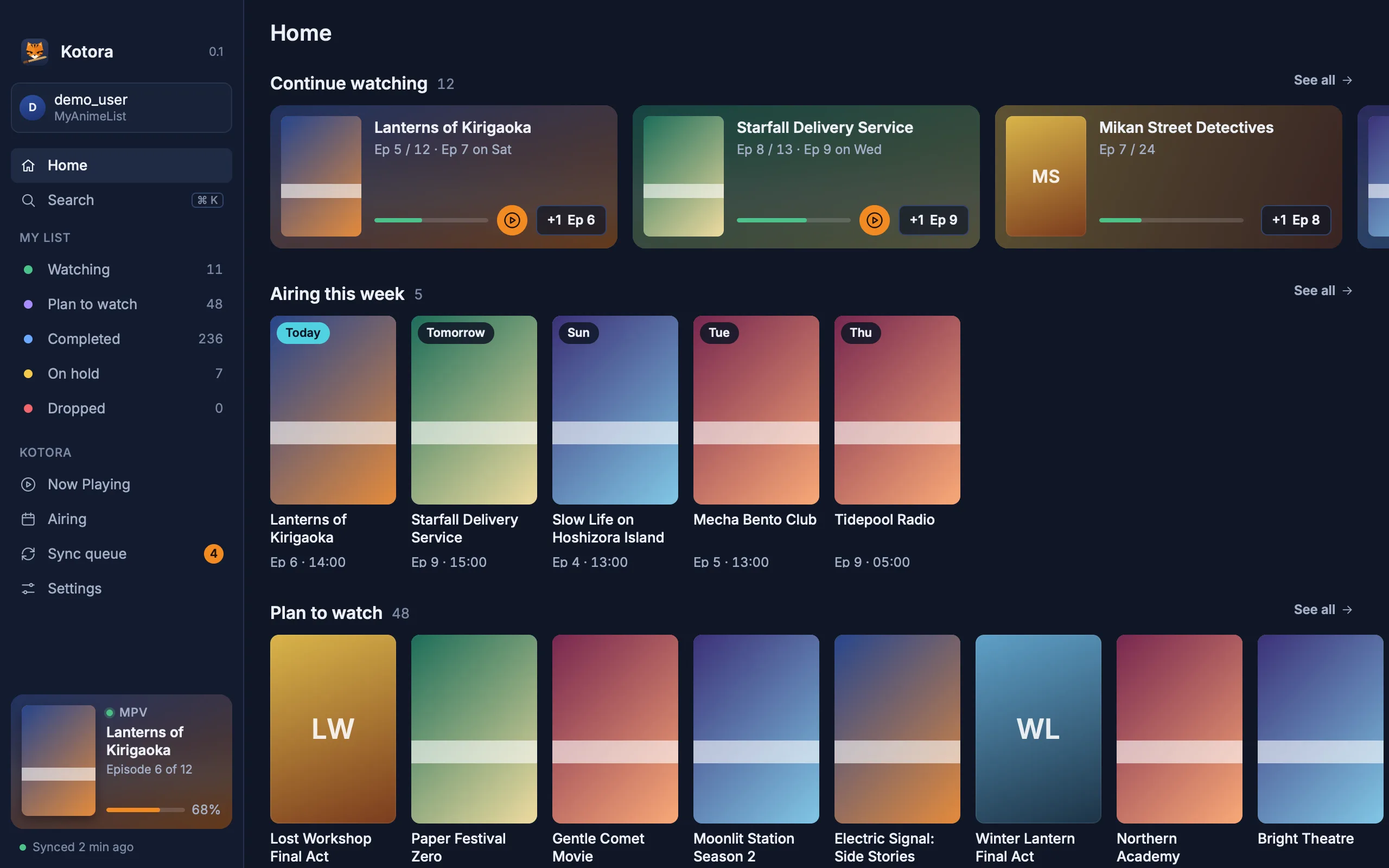
Real screenshots of the Kotora 0.1 build, drawn by the app itself from made-up data. They follow this page's theme, as the app follows your system. Orange means "act here", and there is only ever one.
Kotora
Home: what to continue (with Play when the file is in your folders), what airs this week, and what you plan to watch.
EP 06kot, the command line
Your list, from the terminal.
kot talks to the running app over a Unix socket, so scripts, key bindings and status bars can do everything the window does.
kot nowwhat's playing, and what Kotora thinks it is
kot confirmdismissanswer the banner
kot +1 <title>one more episode
kot set <title> <ep>also --status and --score
kot add <title>search MyAnimeList and add it to your list
kot next <title>play the next episode from your folders
kot list [status]your list as text
kot queuesyncsee the waiting changes, send them
kot config client-idset your MyAnimeList Client ID
~ : zsh
$ kot nowPlaying in mpv (IPC socket, 82%): Lanterns of Kirigaoka episode 6 [Hoshi] Lanterns of Kirigaoka - 06 (1080p).mkv In your list (Watching), sure Update to episode 6? kot confirm$ kot confirmLanterns of Kirigaoka: 6 / 12 · Watching · score 8 (waiting to sync)$ kot syncSending 1 change, then reading your list again.$ kot statusKotora 0.1.2 (build 1)demo_user on MyAnimeList · 303 entries · synced$
EP 07Privacy
Your list stays yours.
Kotora is a client for your own account and nothing more. No server of ours sits in between.
Never your password
You sign in on MyAnimeList's own page in your browser. Kotora gets a token, not your password.
Token in a 0600 file
Readable by your user only. Never in the database, never in logs.
No telemetry
No analytics, no crash uploads, no accounts of ours. This website has no trackers either.
The service is the source
Your list lives on MyAnimeList. Kotora keeps a cache and a queue, only as long as it needs them.
One daily check. Once a day Kotora asks kotora.moe whether a newer version is out, and says so in a banner. It sends its version, your OS and processor type, and how it was installed (for example AUR or install.sh), plus whether this is its first check of the week or month. No ID, no account, no file or anime names, and nothing is downloaded. You can turn it off in Settings → About Kotora → Check for updates; then nothing is sent.
EP 08A thank-you
Thanks, Taiga.
For years, Taiga has been the anime tracker on Windows: it notices what you play, asks, and keeps your list honest. So many of us learned to track anime that way that it felt strange to lose it when we moved to Linux or a Mac.
Kotora brings that idea home, written from scratch in Rust. The name is our small bow: 小虎, ko-tora, a little tiger following a big one.
On Windows, use Taiga. Its developers are working on a cross-platform v2 too, and we cheer for it. (What is alike and what is new: Kotora as a Taiga alternative.)
Kotora is an independent project. It is not affiliated with or endorsed by Taiga or its developers, MyAnimeList or AniList.
小虎
EP 09Install
Get Kotora.
Kotora 0.1.2 is out, free, for Linux and macOS. Pick your system.
Arch Linux
AUR
$ yay -S kotora
Builds from the release source and updates with your system.
Any Linux
From source
$ git clone https://github.com/hanami117/kotora
$ cd kotora && ./install.sh
Needs Rust, git, pkgconf and a Vulkan driver. Builds with Cargo and installs the app, kot and the desktop entry.
Not notarized yet: at the first start, click Open Anyway in System Settings → Privacy & Security. No AppImage or Flatpak yet.
You'll sign in with MyAnimeList. Kotora needs a free MAL API Client ID. If your build doesn't have one, a short guided form in the app helps you create it and paste it in; no file editing.
The last episode. Kotora would mark this page as Completed now.
Is Kotora a fork of Taiga?
No. Kotora is written from scratch in Rust for Linux and macOS. It borrows Taiga's idea (notice what you play, ask, keep your list honest) and its name is a nod to it, but it shares no code and is not affiliated with Taiga or its developers.
Which list services does Kotora support?
MyAnimeList in v0.1. AniList comes in v0.3. Kitsu and Shikimori may come much later.
Do I have to set up my player?
No. Kotora sees mpv, IINA, VLC, mpc-qt, Celluloid, Haruna and SMPlayer by the video file they have open, with no config. That way it has no position, so an episode counts once the file has stayed open long enough, and Kotora asks. For mpv and IINA you can turn on precise detection in Settings → Players (Now Playing offers it once too): it adds one line to the player's mpv.conf, and then Kotora uses the position (80 %).
Does Kotora have to stay open?
It has to run, but not its window. Close the window and Kotora keeps watching from the tray on Linux or the menu bar on macOS. In Settings → Startup it can start when you log in, in the background.
Can I add shows from Kotora?
Yes. Search MyAnimeList in the app, or run kot add, and add a title as Watching, Plan to watch or another status. It works offline too: the change waits in the sync queue. Every title also has a details page.
Does Kotora change my list without asking?
No. By default it asks every time. You can switch on Update automatically in Settings; even then it still asks when the match is unsure, when an episode would be skipped or when it hasn't aired yet, and every automatic update can be undone.
Does it work offline?
Yes. Your list opens from a local cache, edits land at once and wait in a visible sync queue until MyAnimeList can be reached. Conflicts are shown side by side, never dropped silently.
What about streaming sites in the browser?
Use the MAL-Sync browser extension. Kotora tracks local players and does not read streaming sites.
Does Kotora download or play anime?
No. Kotora tracks what you watch in your own player. It does not play, stream or download video.
Is there a Windows version?
No. On Windows, use Taiga, the tracker that inspired Kotora.
Is Kotora free?
Yes, free and open source under the GPL-3.0, with no ads, accounts or tracking. If you'd like to help, there is a Ko-fi page; it is entirely optional.
Does Kotora phone home?
Only for one thing: once a day it asks kotora.moe whether a newer version is out. It sends its version, your OS and processor type, how it was installed, and whether it is the first check of the week or month. There is no ID, account or list data, and nothing is downloaded. Turn it off in Settings → About Kotora → Check for updates and nothing is sent.
Where are my password and token kept?
Kotora never sees your password: you sign in on MyAnimeList's own page in your browser. The access token is kept in a file only your user can read (mode 0600), never in the database or in logs.
When can I install it?
Now. Kotora 0.1.2 is out. On Arch Linux use the AUR (yay -S kotora). On macOS (Apple silicon, 13 or later) download the DMG or use Homebrew. On any other Linux, build it with install.sh. See the Install section.